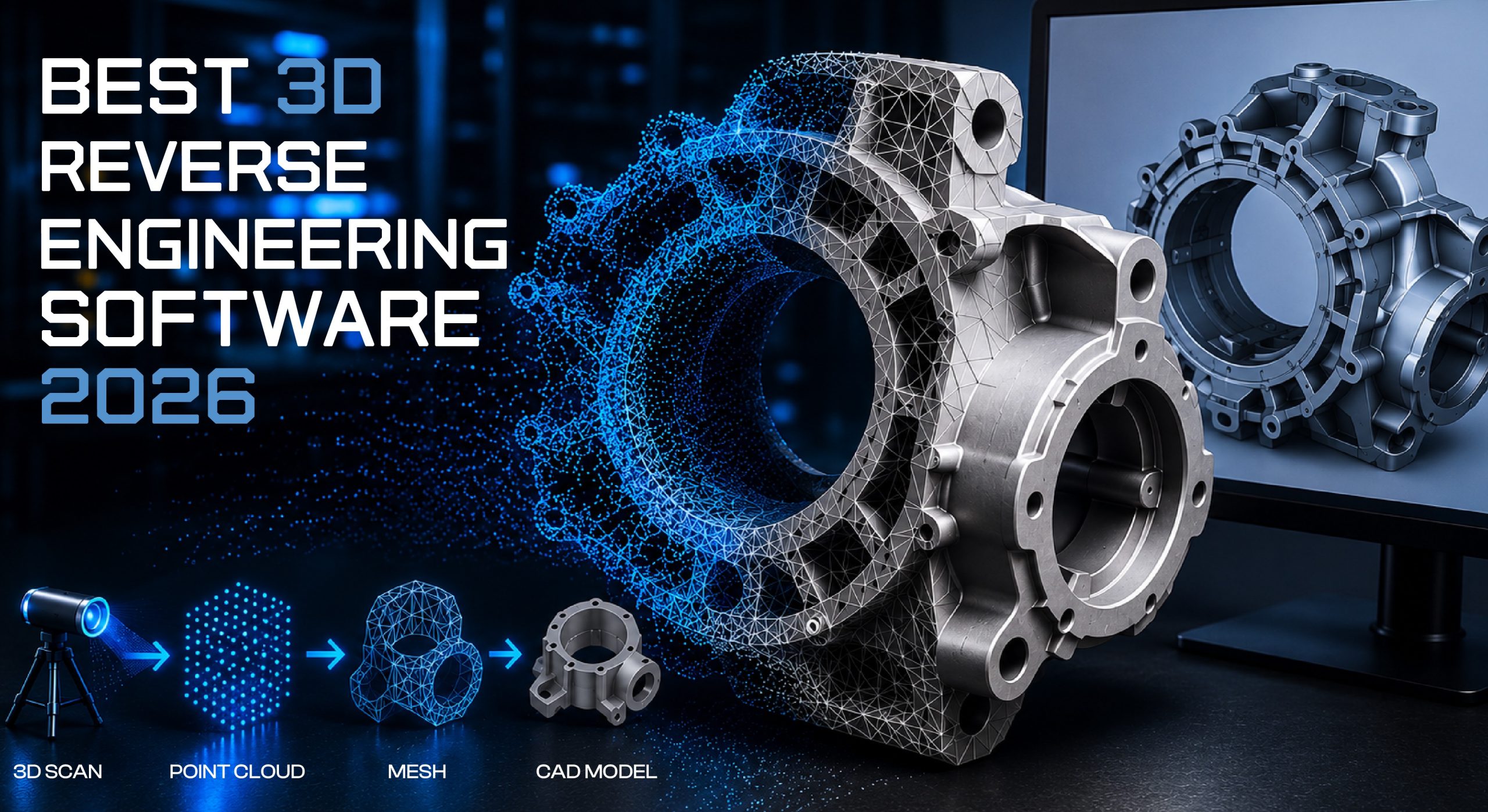
The term Reverse Engineering has gained major popularity in the modern manufacturing industry. It means back-engineering or digitally reproducing an existing physical system. Some technologies are important but have no digital records. You may have a worn-out part, a competitor’s product, or tooling without exact drawings. You want to create an accurate digital model, redesign it, or manufacture it. Using specific software to do this is called reverse engineering.
Whether you are an engineer evaluating your first scan-to-CAD purchase, a designer who occasionally needs to digitize a physical model, or a manufacturer comparing enterprise platforms, you will find a recommendation that fits your workflow and budget below.
Need professional mechanical 3D modeling services? Visit NBYIT for expert guidance.
“Let’s Discuss Your Project & Bring Your Ideas to Life”
What Is Reverse Engineering Software?
Reverse engineering software takes an existing physical object and creates a digital replica from which engineers can analyze, modify, and manufacture that geometry again. Instead of designing from scratch, you work with data obtained by scanning or capturing a 3D model of an actual object.
Reverse engineering software typically specializes in three core areas: point cloud processing, mesh reconstruction, and NURBS-based surface and parametric model creation. This software turns raw laser scan data into editable 3D models usable in your CAD system.
Key Terminology
Point Cloud – The output of a 3D scan: thousands of XYZ coordinates representing individual surface points of the scanned object.
Mesh – After point processing, the surface is formed by connecting all points through triangles. Commonly saved in STL and OBJ formats. It looks like a 3D object but is not a native editable CAD model.
NURBS (Non-Uniform Rational B-Splines) – The standard representation of organic, complex, and smooth curves and surfaces in CAD, and the default surface format used by most reverse engineering software.
Scan to CAD – The complete process of scanning and converting scan data into a CAD model. Often used interchangeably with “reverse engineering software” in promotional materials.
Parametric Modelling – The resulting CAD model contains a history of editing features (extrusion, fillet, revolve, etc.), making future edits possible without rebuilding from scratch.
How Does the 3D Reverse Engineering Workflow Work?
Understanding the workflow helps you choose the right tool for your requirements. Our NBYIT 3D product design team uses this exact process for digital transformation projects.
Quick Comparison Table – All 10 Software
Here is a side-by-side overview of the top reverse engineering tools available in 2026. Use this to shortlist the right platform before reading the detailed reviews below.
| # | Software | Best For | Pricing | Free Trial | CAD Integration |
|---|---|---|---|---|---|
| 1 | Geomagic Design X | Overall / Precision | ~$1,900+/yr | Yes | SolidWorks, Creo, CATIA |
| 2 | PolyWorks Modeler | Large datasets | Enterprise (quote) | Yes | Universal |
| 3 | Artec Studio | Scan + RE combo | Bundled / standalone | Yes | Geomagic, Design X |
| 4 | Siemens NX | Enterprise lifecycle | Enterprise (quote) | Limited | Full PLM |
| 5 | QUICKSURFACE Pro | Best value | Mid-range | Yes (30-day) | SolidWorks, STEP/IGES |
| 6 | Autodesk Fusion | Budget / beginner | ~$680-$1,000/yr | Yes | Fusion ecosystem |
| 7 | Geomagic for SolidWorks | SolidWorks users | ~$1,900+/yr | Yes | SolidWorks native |
| 8 | Rhino 3D + Plugins | Organic shapes | ~$1,000 one-time | Yes | STEP, IGES, OBJ |
| 9 | MeshLab | Free / preprocessing | Free | N/A | Export only |
| 10 | Creaform VXmodel | Inspection + RE | Contact vendor | Yes | Creaform ecosystem |
Best 3D Reverse Engineering Software – Detailed Reviews
The mechanical industry has prospered through reverse engineering. The aerospace industry recreates legacy components that predate digital records. The automotive industry fixes vehicle components. Medical device makers turn hand-sculpted prototypes or 3D scan data into CAD files for production. Let us explore the top tools that make this possible.
1. Geomagic Design X
Geomagic Design X has long been the benchmark choice for engineers transforming scan data into 3D CAD files. Its standout feature is Live Transfer (official site), which enables the transfer of the entire parametric history of a reconstructed file directly into major CAD platforms rather than just exporting a surface part. Engineers can continue editing as if the model was built natively in their CAD system.
Three license packages are available: Go, Plus, and Pro, ranging from entry-level to a fully professional toolset, starting at $1,900 and going up to $10,000 in higher tiers.
Best For: Automotive, aerospace, and medical engineers who need fully parametric, history-based CAD output with deep integration into mainstream CAD platforms.
Cons: High cost for smaller teams; steep learning curve for new users.
2. PolyWorks Modeler
PolyWorks Modeler targets the scenario where other tools struggle: massive datasets of a billion points or more that need to be processed without crashing. It works especially well alongside PolyWorks Inspector for quality control processes, and offers NURBS surface fitting, automatic surface generation, and team-level reverse engineering macros.
Best For: Large-scale industrial metrology and inspection environments requiring extreme dataset handling capability.
Cons: Pricing is not publicly listed; must contact InnovMetric for a quote.
3. Artec Studio
Artec Studio stands out by combining scanner control and reverse engineering tools in a single platform, avoiding the need for two separate pieces of software. The program can fit CAD primitives within the scanning process itself, and for advanced parametric modeling it allows direct export into Geomagic Design X.
It comes packaged with Artec 3D scanners but can also be purchased standalone for users with their own scanning hardware.
Best For: Teams already using Artec hardware who want a streamlined scan-to-model workflow in one tool.
4. Siemens NX
Siemens NX is not dedicated reverse engineering software, but its strong CAD/CAM/CAE capabilities make it highly capable for mesh-to-CAD conversion with deep manufacturing integration. If your team works on a product from start to end, from scan through analysis to machining, NX can handle the complete development lifecycle.
Best For: Enterprise teams that need one unified platform covering the entire product development process, from reverse engineering through simulation and manufacturing.
5. QUICKSURFACE Pro
QUICKSURFACE Pro offers a perpetual license with one year of maintenance support, with an annual renewal at a 10% license fee. Annual subscription leasing is also available. It won the “Best 3D Scan-to-CAD Solution” award from SME News in 2025, and is used across automotive, aerospace, medical, and consumer goods sectors. Powered by the Parasolid kernel, it delivers award-winning accuracy at a genuinely affordable price compared to enterprise competitors.
Best For: Professional engineers and designers who need high-end scan-to-CAD accuracy without enterprise pricing.
Cons: Smaller user base than Geomagic; less advanced surfacing tools for extreme Class-A surface creation.
6. Autodesk Fusion
Autodesk Fusion is primarily an integrated CAD/CAM/CAE system, but includes built-in tools for mesh-to-B-rep conversion that allow basic reverse engineering without a dedicated solution. It is well-suited for simpler mechanical parts, but is not intended for highly organic, freeform geometry that specialist reverse engineering tools handle. As of 2026, the standard subscription runs around $680/year for the base commercial plan, with a free tier for qualifying hobbyists and students.
Best For: Beginners, hobbyists, and teams who need occasional reverse engineering as part of a broader design workflow without the cost of dedicated software.
7. Geomagic for SolidWorks
Hexagon’s reverse engineering technology has been integrated as a native add-in to SolidWorks through Geomagic for SolidWorks. Users no longer need a separate application or file transfers between platforms. Automated surfacing and parametric modeling tools are available directly within SolidWorks, making it ideal for teams whose entire CAD workflow is built around that platform.
Best For: SolidWorks users who want to reverse engineer without leaving their primary design environment. No platform switch required and full access to the SolidWorks ecosystem throughout the entire reverse engineering process.
8. Rhino 3D + Plugins
Rhino 3D offers a strong balance of simplicity and capability for both simple and complex models. When considering cost, functionality, and ease of use for reverse engineering, Rhino 3D surpasses many more expensive alternatives for organic shape reconstruction. Its extensive plugin library, including RhinoResurf and T-Splines, enhances modeling capability significantly. Thorough online documentation makes it easy for new users to get started.
Best For: Designers and engineers working with organic or freeform shapes who want affordability and flexibility.
9. MeshLab
MeshLab is a free, open-source mesh processing and editing tool popular in academic and research settings. It is genuinely useful as a preprocessing step: point cloud processing, mesh cleanup, and format conversion, even for teams that rely on paid software for the actual CAD reconstruction stage. There is no licensing cost whatsoever.
Best For: Researchers, academics, and engineering teams that need a powerful free preprocessing tool before moving to a paid CAD reconstruction platform.
Cons: No parametric CAD output. It stops at mesh editing. The interface has a real learning curve for advanced operations.
Need Help Choosing the Right Software for Your Project?
The NBYIT team provides expert consulting on engineering software selection and implementation. Contact us at NBYIT.com
Conclusion
Most reverse engineering software in 2026 is well aligned with modern working ecosystems. But the right choice depends on your budget, the complexity of your geometry, and how deeply you need the result integrated into your existing CAD environment.
Geomagic Design X remains the benchmark for teams needing maximum accuracy and CAD integration regardless of cost. QUICKSURFACE Pro offers the strongest value for engineers who want professional results without enterprise pricing. Autodesk Fusion and Rhino 3D serve budget-conscious users well.
Whatever direction you lean, take advantage of free trials before committing. Nearly every paid tool offers one. There is no substitute for testing a platform against your own scan data before you buy.
For more expert guides on engineering and IT tools, visit NBYIT.com.